Workflow vs AI agent: one invoice, three paths, 6 of 6 fields every time
I ran one invoice through a workflow and an agent on two engines. All read 6 of 6 fields, and the workflow was over 40 times cheaper and almost 2 times faster.
 Przemysław Filipiakcreator of delta240mvt
On Monday afternoon I wanted to send an invoice through by hand for a comparison. I didn’t make it in time. The workflow I set up at the start of November had already picked it up from the inbox, read it and created a card “Pay the invoice”. I wrote to Claude something like: I already have some workflow set up, because it caught the invoice right away, which card is it? And that was the best introduction to what I wanted to check.
The question was simple: do I need an AI agent for invoices from email, or is a plain workflow enough? I sent the same test invoice down three paths and recorded accuracy, time and cost. On the portal I collected general material in the hub on harnesses and agent evaluation. Here is my measurement, on my platform.
Where the three paths come from
For a few weeks I’ve been building, step by step, the platform from the Autonomia Kodu course. A board with task cards, and a card can be done by a person, a workflow or an agent. How the agent remembers feedback and what it costs in złoty, I described in the post about an AI agent for quotes with visible memory.
Until now the agent ran on one engine: Claude Managed Agents. It’s convenient. Anthropic provides a ready workspace, files, skills and memory, and I give the instructions. But everything happens at the provider, and the provider tells you what a session cost.
On Monday I built a second engine: my own harness. It’s a separate program on Cloudflare, written in the Flue framework. It gets the instructions, the model and the list of tools from the platform, runs the conversation with the model, and carries out the tools on the platform side. Each conversation has its own small database. The platform watches the budget and has a “Stop” button.
The third path is the “Invoices from email” workflow, which has been running since the start of November. It checks the inbox every 5 minutes. By the time of the comparison it had run more than 3,200 times.
Why invoices at all? Because it’s typical, repetitive work in a small business. Every cost invoice is the same moves: open the email, download the PDF, copy the number and the amount, put the file in the right folder. Always the same. A perfect candidate for checking whether an agent is needed here at all.
What I had to add so my own harness could do the same
One day, four steps. First the engine itself: an “engine” field in the agent form, and below it a list of models that depends on the engine. On my own harness there are Gemma 4 26B from Workers AI and three Claude models through the Claude API. This is where I hit the first snag: the lesson talked about six models, and I saw four. I reported it as a bug in the course and moved on.
The first try on the new engine was almost free. The card “Replies to customers”, the Gemma model, no network: 33 seconds and 0.0055 złoty. The quote agent on the same engine, with Claude Haiku 5.5: 36 seconds and 0.0187 złoty.
Then the workspace. My own harness doesn’t have a container from Anthropic, so it got its own, in Modal. One container per session, the same folders as in the managed engine, commands, reading and writing files. Network access comes from the agent’s environment settings: no network, only listed addresses, or full network with permission for packages. A detail that took a while: a large file has to go into the container in pieces, because a single command has a size limit.
The most interesting decision was about skills. In the managed engine the platform sent the skill package to Anthropic and kept only its name and description. My own harness has no access to that storage. So the platform now keeps its own copy of every package and puts it into the container at the start of a session. The ready Word and PDF skills ship with the container image, because they are part of the platform, not of the company.
Finally, memory: entries and change history on the platform, and a “Remembered” list under the result. Along the way I asked directly where these notes live at Anthropic and whether it’s permanent storage. On my own engine I have the answer right away: in my database, with versions.
How do you compare a workflow and an AI agent fairly?
On one input and with the same model. The same message with the invoice, the same 6 fields to check, and on both agent engines the same Claude Haiku 5.5 with the same effort.
The workflow went first. It marks a processed message with a label and wouldn’t take it a second time, while the agent reads it despite the label. That way all three paths worked on the same email. I didn’t let the agent create follow-up cards. It only had to open the PDF, find the fields and save the file to Drive. If it did more, the comparison would no longer be about reading alone.
Everything ran on staging, the test copy of the platform, on a test invoice generated for this step. No real documents were involved. On my own harness the platform runs every agent tool only after checking the session token, and if the budget is exceeded it stops the conversation by itself. I enter the session budget in dollars, and a hint under the field converts it to złoty at today’s rate.
The fields: seller, tax ID, number, issue date, payment due date and gross amount. Plus the type of invoice: a cost invoice or one issued by the company. The result:
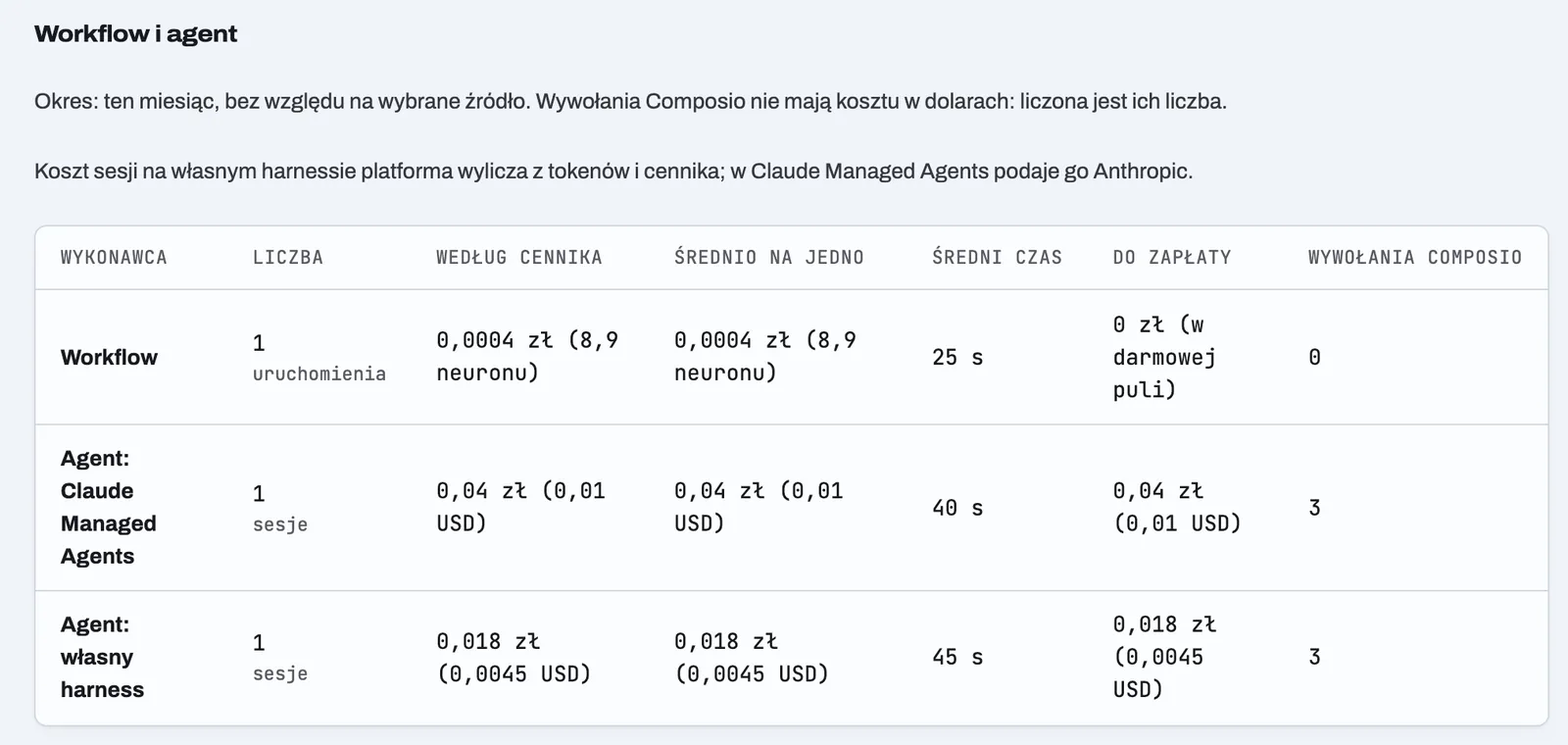
| Path | Correct fields (of 6) | Time | Cost |
|---|---|---|---|
| Workflow | 6 | approx. 25 s | 0.0001 USD (8.9 neurons, within the free allowance) |
| Agent: Claude Managed Agents | 6 | approx. 40 s | 0.01 USD (amount from Anthropic, rounded to the cent) |
| Agent: own harness | 6 | approx. 45 s | 0.0045 USD (from tokens and the price list) |
All three paths also recognized that it was a cost invoice, and saved the PDF to Drive. The only difference is time and money.
What surprised me in the numbers
On an invoice, the workflow wins. It’s over 40 times cheaper than my own harness and almost 2 times faster, with the same accuracy. Compared to Claude Managed Agents it’s about 100 times cheaper. The direction was predictable, the scale less so.
Something else was less obvious. The same model on my own harness came out more than 2 times cheaper than on the managed engine, but 5 seconds slower. Part of the difference is rounding: Anthropic reports the session cost in cents, so 0.01 USD may mean less. My harness calculates the cost itself from tokens and the price list, down to a fraction of a cent. That’s why the “Usage” page says so directly under the table.
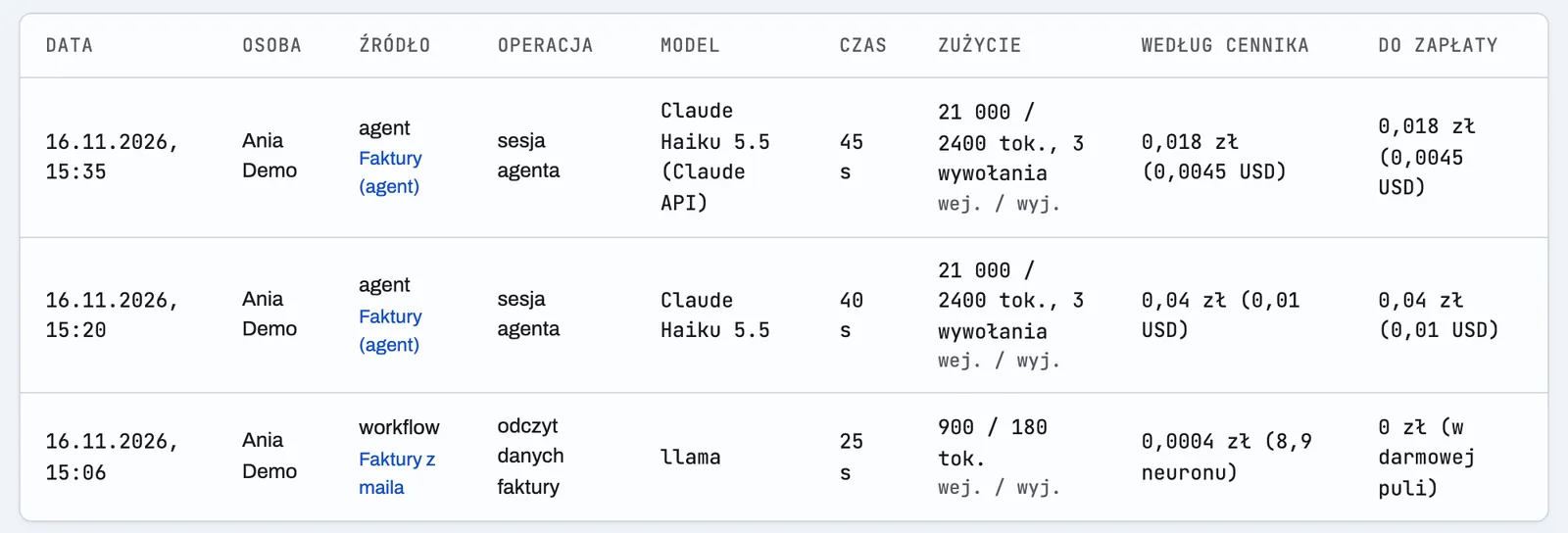
The workflow has one more advantage you don’t see in the table. It uses Workers AI, and Cloudflare gives 10,000 neurons a day for free. On Monday my allowance was almost used up, 9,884 of 10,000, and I asked right away: how will Cloudflare charge for this? On the free plan it charges nothing. Once the allowance is used up, further calls fail with an error until midnight UTC, which is 01:00 in Poland. One invoice read uses about 10 neurons on average, 17 at most. The allowance is shared by the whole account, so other projects can use it up earlier.
So what do I need an agent for?
For things whose steps can’t be written down in advance. An invoice always has the same fields, so a workflow reads it without thinking. A customer quote doesn’t work like that. You have to read the request, pick items from the price list, check earlier quotes and put the document together. That’s where an agent pays off, and that’s where I keep it.
There’s one more thing that speaks for a workflow with invoices. It has a built-in step “create a card for payment”. An agent would do the same only if I gave it such a tool and added it to the instructions. That means more places where the model can understand something its own way. In the workflow the step is simply there and always looks the same.
There’s something funny about it. I spent a whole day building a second agent engine, with a container, skills and memory. And the best result came from the most boring part of the platform, which has been quietly doing its job every 5 minutes for two weeks.
This measurement set the order of my thinking. It’s easy to start with an agent, because “it’ll figure it out”. Now I start with a question: can I write the steps down on a sheet of paper? If yes, it’s a workflow. An agent only where the sheet ends.
And my own harness? It stays as a second engine. Not because it’s faster, but because I have everything on my side: copies of the skills, memory with versions and cost counted down to a fraction of a cent. Every part of the system defends itself, as with the holes AI leaves in vibe-coded apps.
What I take from this
The cheapest agent is the one you don’t have to run. Before you build an agent for something repetitive, run it once through a workflow and write three numbers in a table: correct fields, time and cost. Then do the same with the agent.
My rule for the future: for every new automation, one input, three paths, one table. The numbers decide, not the feeling that the agent is smarter.
I work with people 1:1 under the delta240mvt brand. On your project, from the first step.
See the offer ↗