Hreflang on a personal site: how I made my blog bilingual like delta240mvt.com
I moved my whole site to English in one commit: hreflang with x-default, language picked by time zone and an audit that checks 36 pages before each deploy.
 Przemysław Filipiakcreator of delta240mvt
On Saturday, November 14, I wrote Claude one instruction: rebuild the whole site in English as well. The same SEO checks as on the portal, the same language switch as on delta240mvt.com. The layouts have to match, so moving between the two sites doesn’t feel like jumping into another world. The result was one commit: 112 files, more than 4,000 new lines, eight posts in English and hreflang tags on every page that has a translation.
This post is about how I did it on my own site and what surprised me along the way. General SEO rules for sites built with AI are on the portal, in the guide to SEO and accessibility for a site built with AI. Here is my specific case, with numbers.
Why I need English on a personal site
delta240mvt.com has been bilingual for a long time, and the “About” page on the portal now links here. Someone reads there in English, clicks and… lands on a text in Polish. A dead end. My site is supposed to support the portal, not cut it off.
The second reason is simpler. The projects I write about aren’t only for Polish readers. 3D films, an agent platform, a model that rates reels. If someone abroad types my name, they should get the same thing you get.
I found the third reason only while working: from now on every post is written in two languages right away. This one too. The automation that writes the blog got new rules: the English version is required, and a linter checks that both versions have the same sections, the same numbers and the same media.
What is hreflang and why does it only work in pairs?
Hreflang is a tag in the page header that tells Google: this page is in Polish, and its English version is at this address. It only works when both versions point to each other.
That was the first thing I checked in Google’s documentation. Each language version has to list itself and all the others. If the Polish post points to the English one, but the English one doesn’t point back, the search engine may ignore both tags. So a half-done setup gives you zero, not half.
That’s why every translated page on my site has three lines: pl, en and x-default. The last one says what to show someone whose language matches neither version. On my site that’s Polish, the same as on the portal.
The second thing surprised me. Google doesn’t decide a page’s language from the lang attribute or from hreflang itself. It has its own algorithms for that. So an English page with a Polish menu or a Polish line in the footer is a sign that something is off. I translated everything: the menu, the footer, the breadcrumbs, the dates, the categories, the privacy policy, the site map, the RSS feed and llms.txt.
The third thing is the exceptions. List pages from the second one up (blog, page 2, page 3) have no hreflang at all, same as on the portal. RSS feeds don’t either. The tag only goes where there really is a pair.
An English address is not a word-for-word translation
At first I wanted to just add /en in front of the Polish address. It would look like this: /en/blog/hook-nad-pierwszym-ujeciem. Fast, but pointless. An English speaker sees an address in the results they can’t read, and it has not a single word they would type into a search engine.
So every post has its own English slug that carries the topic, not the words. “Klatki kontrolne przed renderem” becomes “check frames before the render” in English. “Fakty z datą ważności” becomes “facts with an expiry date”. The English version has a field in its header that says which post it translates. From that one field the site builds the switch, the hreflang tags, the site map and both RSS feeds by itself.
Same with categories. “Wyskaluj” is “Scale”, “Kulisy projektów” is “Behind the projects”. The English title isn’t a copy of the Polish one either: it starts with a phrase an English speaker would really type. The glossary of hard words next to each post got its own English examples, and the cards for sharing on social media have English titles.
I spent the most time on details nobody notices until they’re missing. Dates in the American format. Reading time counted again, because English text usually has more words. Złoty stays złoty, I don’t convert it to dollars.
Language by time zone, not by IP address
The switch is one thing. But what about someone visiting for the first time? The portal has guessed the language for a long time, and I wanted the same behavior here.
The simplest way is the IP address and a service that tells you which country the visitor is from. I didn’t go that way. Instead, a small script in the page header asks the browser for its time zone. Europe/Warsaw gives the Polish version, any other zone gives English. Nothing leaves the browser, nothing is saved.
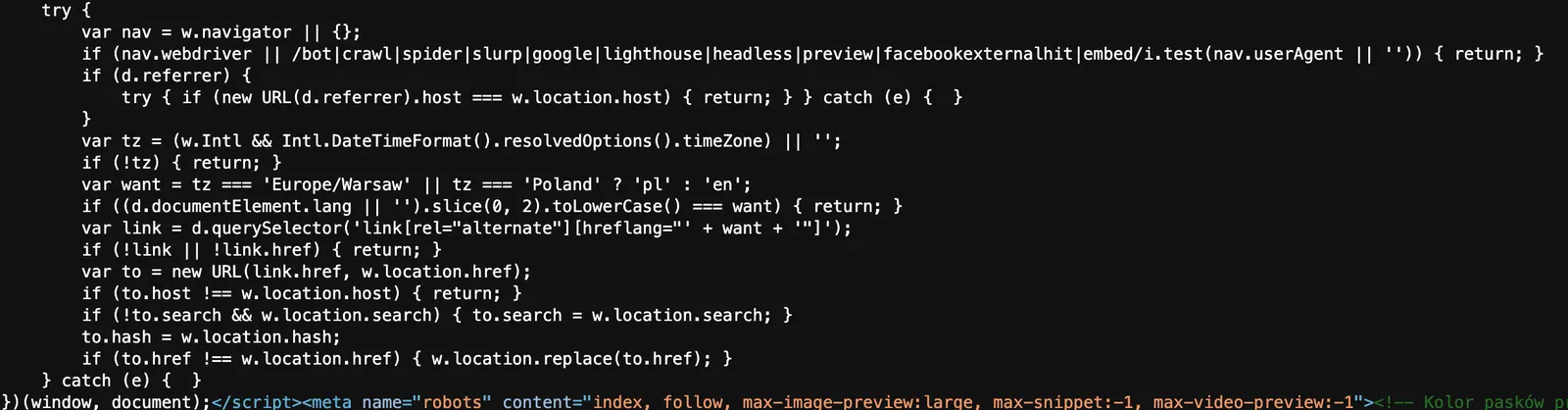
The most important parts are the conditions where the script does nothing. It doesn’t run for search engine robots, because Google has to see and index both versions. It doesn’t run when the referrer is from the same domain, which means a move inside the site. If you click EN and then a link on the blog, nobody sends you back to Polish.
And one more detail that came out in testing: the redirect uses location.replace. The entry page doesn’t stay in the history, so the “Back” button doesn’t fall into a loop. Without it, someone from abroad clicks “Back”, lands on the Polish version and the script throws them over again. There is a separate test for this.
How do I check that hreflang really works?
With an audit that runs on every build and a second time on production after the deploy. I don’t trust checklists you have to remember.
The script takes the site map and checks every page in turn. One title, one description of 110–160 characters, a canonical equal to the address, one H1, image descriptions, footer links. For hreflang: is there a pair, does the page point to itself, is there an x-default and does the other page point back. Plus the files for search engines and AI models. Today’s result on production:
| What the audit checks | Result |
|---|---|
| Pages in the site map | 36 |
| Of which Polish / English | 18 / 18 |
| Files for robots and AI (robots.txt, sitemap, 2 × RSS, llms.txt, llms-full.txt, 2 × site map page) | 8 |
| Critical and high issues | 0 |
| Status | PASS |
If the audit finds a critical or high issue, the build stops and nothing goes to production. The post automation works the same way: before publishing it runs a linter that checks the PL / EN pair, the meta descriptions and whether the English text links to English pages. My earlier post about a “state of knowledge” date and a script that checks facts is about the same approach, just for content: a rule in code instead of in my head.
One more small thing came up on the way. Google had an old post address in its index that today exists only in English. It got a redirect to the English blog. One line in the redirects file, and someone coming from a search engine doesn’t hit a 404 page.
What the first days showed
It’s too early for conclusions, but there are numbers. In Search Console the week of November 8–14 gave 36 impressions and 3 clicks, with an average position of 7.8. The week before it was 15 impressions, zero clicks and position 9. Bing has 60 pages in its index, which means both language versions already. Almost all queries so far are my name.
And this is my personal goal: for “Przemysław Filipiak” I’m at position 10 on average today, right at the edge of the first page. I want to be higher, and the second language gives Google twice as many pages that say who I am and what I do.
To be honest: I don’t know yet how much of that comes from English. Hreflang doesn’t bring traffic on its own. It makes sure someone in Germany doesn’t get the Polish version in the results, and someone in Poland doesn’t get the English one. I’ll see the effect in a few weeks in the weekly report, which counts positions every Sunday anyway.
Hosting is still free Cloudflare Pages, which I wrote about in the post on SaaS security on free Cloudflare. The second language changed nothing in the costs. It changed one thing: every post is now two files instead of one.
What I take from this
The translation didn’t eat most of the time. The exceptions did. Which page has a pair and which doesn’t. When the script should guess the language and when it should stay quiet. What happens to the browser history. These are things you don’t see at first glance, but they spoil the impression in the first second.
If you’re adding a second language on your own site, start with the pairs and the audit, not with the translation. First decide which pages have a counterpart, and let a script in the build check that each of them points to itself, to the other version and to x-default. Translating the text is the easiest part today.
My rule for the future: everything that has to work in two languages gets checked by a machine on every deploy. I only have to remember to write.
I work with people 1:1 under the delta240mvt brand. On your project, from the first step.
See the offer ↗