An AI quote agent with memory: see what it saved and what it cost
I gave my quote agent a memory on one condition: under every result I can see what it saved. And what the session cost, in Polish złoty.
 Przemysław Filipiakcreator of delta240mvt

On Tuesday I gave my quote agent a memory. The scenario I built it for is simple. A quote goes out correct, but I leave a note on it: the discount should be on a separate line, not folded into the price. On the next quote the agent should already know that, without a reminder.
Nice? Nice. But before I switched it on, I asked myself a question: how will it know that, and what else will it write down for itself? Because if the agent remembers things I can’t see, a month from now it will be doing things I don’t understand. That’s what this post is about: how I build an agent’s memory so that it stays visible, and why I see the cost of every session in złoty. What agent memory is in general, I describe on the portal, in the hub on AI agent memory. Here is my specific case.
Where this agent came from
For a few weeks now I’ve been building, step by step, the platform for the Autonomia Kodu course. In short: a board with task cards, and a task can be done by a person, a workflow or an AI agent. The agent takes a card, works in its own environment, puts the result back on the card, and the card moves to the “To review” column. A person accepts it or sends it back to be done again.
This week I went through four steps: the agent’s work environment and files, the skill library, memory, and finally the agent on a recurring task plus a page with costs. As a test case I built a quote agent. It gets a price list and a few earlier quotes, and the skill puts together a finished quote in Word from the data and adds up the totals. There is also a PDF for sending. A detail that ate some of my time: the PDF needs a font with Polish characters, otherwise the złoty sign and the accented letters come out as little squares.
A skill is just a package: instructions for the agent, a script and a data template. On staging I compared two sessions of the same agent, without the skill and with it. I looked at the number of tool calls, the time, the cost, and whether the second session loaded the skill at all. That’s my rule with agents: I don’t ask whether it “works better”. I look at the numbers from two sessions side by side.
Environment and files first, memory second
The order is not an accident. Before the agent got a memory, it got a work environment. It’s a separate container for the length of the session: the agent can run a script in it, put a file together, recalculate a table. Searching the web and fetching pages is a separate switch, off by default. A quote agent doesn’t need to read the internet to work out a quote from a price list.
On top of that, two file tools. One brings a file from an approved service into the container. The other saves the finished file to the Google Drive of the person who assigned the card. An important detail: the agent never provides a file address itself. It picks from what has been shared with it, and the save location is counted from that person’s “My Drive”. Fewer places where the model can make something up means fewer places where something goes the wrong way. It’s the same rule I described with the holes in vibe-coded apps: every part of the system has to defend itself.
The card shows a trail: which commands the agent ran in the container and which files were created, with their size. I shortened that trail, because at first it was a wall of text nobody would read. A trail nobody reads gives you no control at all.
Testing on staging brought up one more question I asked myself: and when does the session disappear? A working file in the container lives as long as the session does. If it’s meant to stay, it has to land on the Drive. That changes how you think about an agent. The container is a desk for one task, not an archive.
And here I get to memory. Because if the desk is cleared after every session, everything the agent should know tomorrow has to be written down somewhere else. The only question is where, and who sees it.
How do you check what an AI agent remembered?
The simplest way: show under every result exactly what the agent saved in that session, and give the memory an editor with a change history. Without that, memory you can’t see is a black box.
Agent memory sounds innocent. The agent writes its conclusions to files and reads them in the next session. Except that means the agent’s behavior depends on things it wrote for itself. If it misunderstood a note, it will keep repeating it forever.
So I did three things before I let the agent remember anything at all.
First, under every session result on the card there is a “Remembered” block. It shows what the agent saved to memory in that session, with the content. Not “memory updated”, but the exact sentence it will be reading from now on. I check the result and see straight away what it learned.
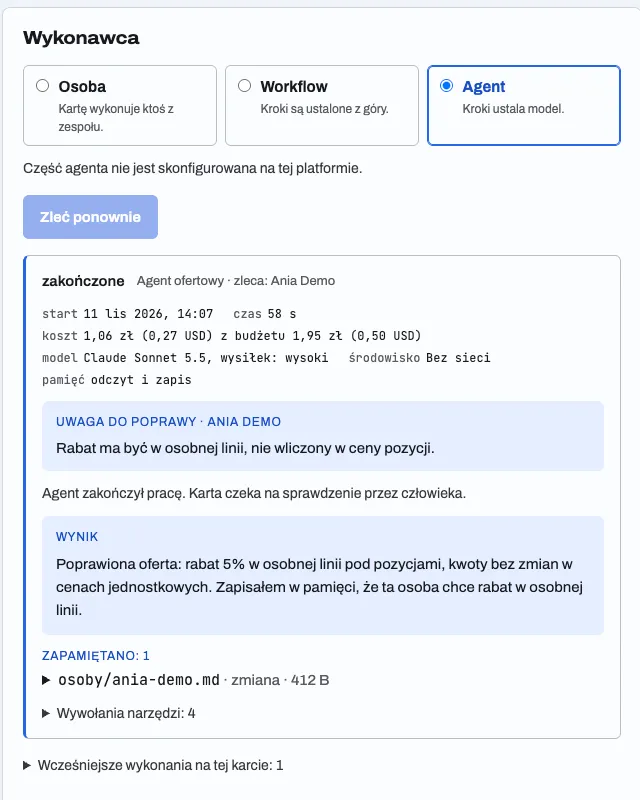
Second, the agent’s page has a section with its memory entries. I can edit them, add them, delete them, and every change has a history. If the agent remembered something stupid, I delete it with one click and I can see when it got in.
Third, memory sits in the agent’s form: a switch, a mode and the rules for remembering. Off by default. An agent without memory is still an agent, and often that’s enough.
If you can’t check in 10 seconds what your agent knows, you’re not the one managing it.
A company rule is not one person’s habit
This was the most interesting design problem. The note “discount on a separate line” can mean two things. Either that’s how all quotes in the company are done, or that’s how one particular person who assigns cards likes it. If the agent throws both into one bag, one person’s preference becomes a rule for everyone.
So memory has two places: the company rules and a separate file for each person who assigns work. In every session the agent is told who assigned the card, and it reads the general rules plus that person’s file. The default rules for remembering tell the two apart by the wording of the sentence. For example, “in the company every quote has…” sounds like a company rule. “I prefer…” sounds like a personal habit.
It won’t be perfect. Sometimes the agent will file something in the wrong place. But thanks to the “Remembered” block I’ll see it right away, not after twenty quotes.
The second piece that closes the loop is “Run again” with a note. When I don’t like a result, I don’t write a new card from scratch. I run it again and add what to fix. The new session gets the previous result and my note, and an agent with memory switched on saves a conclusion from it for the future. So the fix doesn’t vanish after one quote.
What does an AI agent session cost in złoty?
In my test, two sessions of the quote agent cost 2.27 złoty together, 1.13 złoty per session on average, at the NBP rate from the day of the event. The “Usage” page shows it, and it’s the second thing I closed this week. Agents and models count costs in dollars. In a Polish company the bills are paid in złoty. When you show someone a dollar amount per session, they have to convert it in their head, and usually they convert it wrong or not at all.
So once a day the platform fetches the average dollar rate from table A of NBP, the Polish central bank, and stores the rates day by day. Every event is converted at the rate from the day it happened, not today’s rate. Plus the free pool: as long as usage fits within the free limit, the cost is zero and the page shows that, instead of scaring you with a theoretical amount.
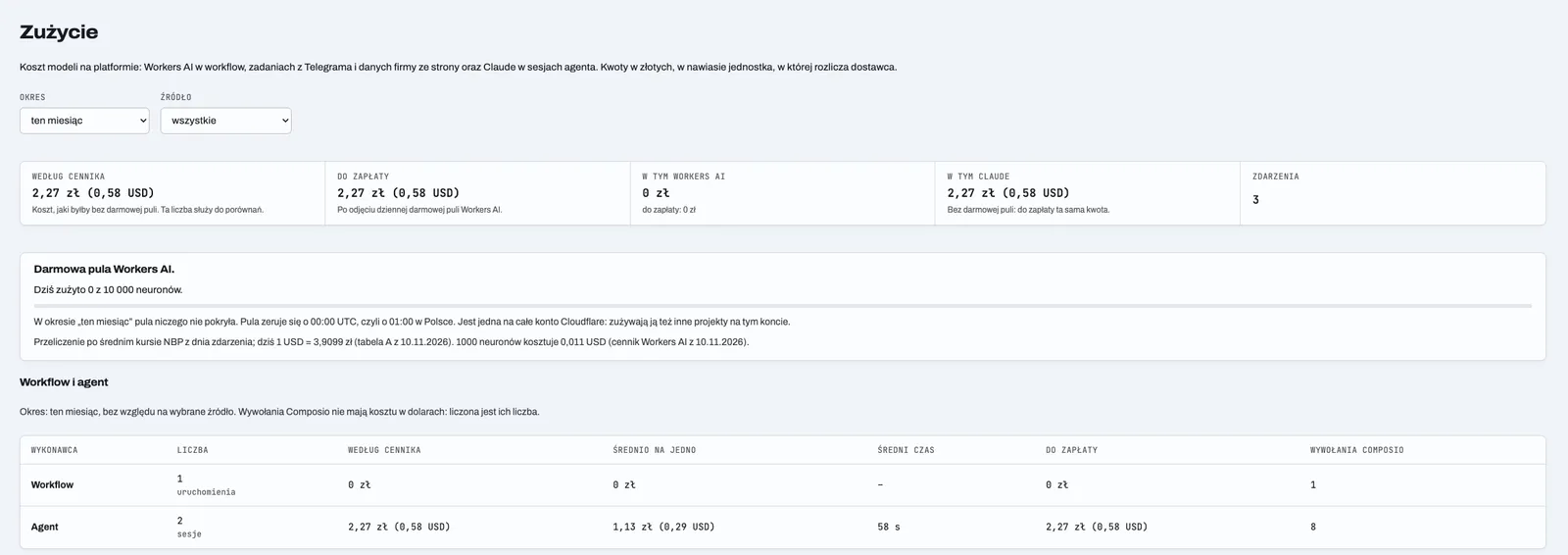
You can see the cost in three places. Next to every agent session. Next to workflow runs. And next to a recurring task, as an estimate of the monthly cost, worked out from the budget of one session and how often it runs. You set up an agent that should do something every hour, and you see straight away what that adds up to in a month. Before, not after.
Why the rate from the day of the event and not today’s? Because the October report shouldn’t change just because the dollar got more expensive in November. A cost you’ve already spent is closed. If a number in an old report jumps from week to week, nobody trusts it and everyone goes back to the spreadsheet. Texts work the same way, which is why next to numbers on the portal I put a “state of knowledge” date and a script that checks the facts. And I want this page to be the only place where people ask about it.
For recurring tasks I added two more safety catches. The shortest interval is one hour. And one task can have only one open card. If the agent hasn’t finished the previous one, a new one isn’t created. Without that, a single stuck session can churn out cards for a whole day.
One last detail: model effort. In the agent’s form you choose the default level or one of five. The level lands in the agent’s configuration and is saved with the session, so next to the cost I also see what level of thinking it worked at. A higher level means longer and more expensive. Sometimes it’s worth it, often it isn’t.
What I take from this
An agent with memory is far more useful than one without. But only when its memory is as visible as its result. Otherwise, after a month you have an employee who does things “just because”, and nobody knows where it got that from.
A rule for the future that you can take into your own automations, even very simple ones: every step that changes how the system will behave later should be visible in the place where you check the result. A saved preference, a new rule, a changed threshold. Plus the cost in the currency you pay in, at the day’s rate.
If you’re building something with agents, start with this question: where will I see what my agent learned today? If the answer is “nowhere”, that’s the first thing to build. Before the next tool and before the next skill.
I work with people 1:1 under the delta240mvt brand. On your project, from the first step.
See the offer ↗