Keeping AI articles current: a “state of knowledge” date and automated fact-checks
A glossary next to the paragraph, a “State of knowledge” line and a script that checks numbers against sources every week. How I keep 61 texts current.
 Przemysław Filipiakcreator of delta240mvt

On Friday a script I had written a few hours earlier returned a list of mismatches. One of them: three texts on the portal listed Anthropic’s strongest model at 10 and 50 dollars per million tokens. The model already had a newer version, and the price had dropped to 8 and 40. An example in one of the texts, the cost of a thousand calls, came to 45 dollars. Today it’s 36.
Nobody reported it to me. The texts were three weeks old. In that time a version changed, a price, the name of a mode in one tool and the wording of one rule in the documentation. That’s what this post is about: how I treat the texts on delta240mvt.com like code that has to be maintained, not like something you publish once and leave.
Two problems every text about AI has
The first problem is words. I write for people who want to start building with AI, not for programmers. And still, an ordinary text about MCP throws in host, client, server, JSON-RPC, specification. Each of those words is a moment when someone stops reading. Or opens a second tab with a search engine and never comes back.
The second problem is facts. Model prices, version numbers, mode names, plan limits. In the AI world all of that changes every few weeks. A text that was true in October quietly lies in November. And that’s worse than a typo, because the reader makes a decision based on that number.
These two problems are connected. Plain language builds trust: someone understands what MCP is for the first time and comes back for the next text. One wrong price knocks that trust down faster than the glossary built it. So you can’t do just one half.
For both problems I did one thing this week: a system. Not “I’ll read it one more time”, but concrete fields, rules and a script.
The glossary sits next to the paragraph, not at the end
Before, I explained hard words in the text, in brackets, or not at all. Now every text has a glossary, but not at the bottom of the page. Each entry sits next to the paragraph where the word first appears. On a wide screen in the right margin, beside the text. On a phone in a box, right under the paragraph.
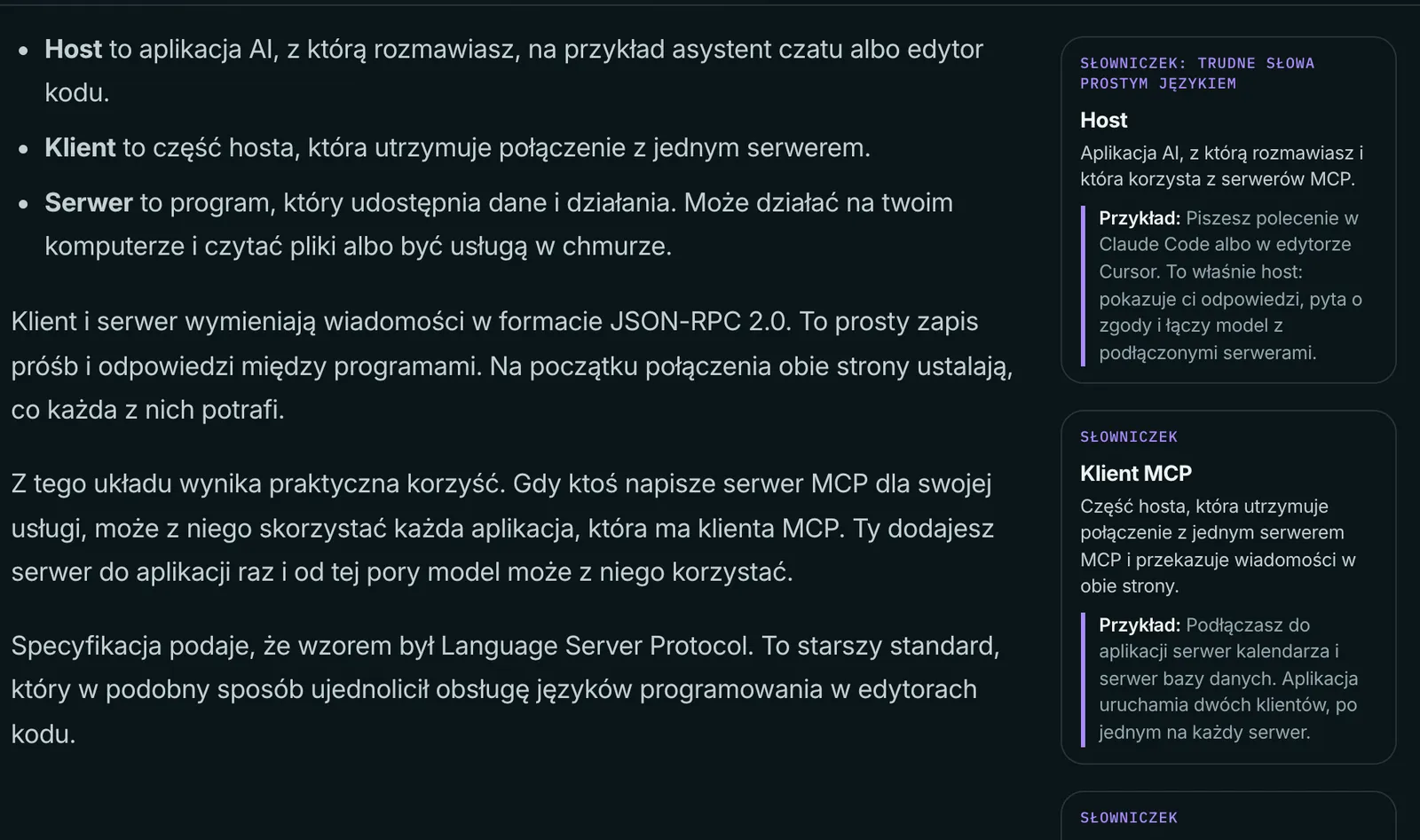
Each entry has three parts. The term. One or two sentences of explanation without jargon, so that someone who has never programmed gets it. And an everyday example that starts with “Like…”. That third part was the most important. A definition tells you what something is. An example tells you how it feels.
The rule for the example: a concrete situation from daily life. A currency exchange counter, a cloakroom, a kitchen, a doctor’s surgery. Not another definition in different words. If the example needs a hard word, it isn’t an example.
You see the difference best on one entry. Weak: “tokens are the units a model splits the input text into”. All true, but after that sentence you know as much as before. Better: “pieces of text you pay for”, plus the example with a taxi charged by the meter. You get at once why a longer conversation with a model costs more.
That’s what I want from every entry: after two sentences the reader knows what to do with the word.
Each entry also has an English version, because the portal comes in two languages. I don’t translate the example word for word. I look for a situation that works in that language.

That same Friday I went through everything that had been on the portal from the start this way. Numbers from the commits:
| What | How many texts |
|---|---|
| Articles with a glossary and plainer language | 48 (in 10 batches) |
| Essays with a glossary | 6 |
| “First week” lessons, rewritten from scratch | 7 |
| Texts checked against sources on 13 November | 47 |
| Source addresses fetched for comparison | 275 |
I rewrote seven lessons from scratch instead of just topping them up. The old version assumed the reader could already open a terminal. The new one starts with installing the Claude or ChatGPT app and working with an agent in the Code tab or in Codex. Each lesson has commands to paste, one task for today, an “if something doesn’t work” section and two animations in the text that show the step instead of describing it. I checked the steps and mode names in both companies’ documentation the same day. Because a lesson where the button has a different name than on the screen ends at step one.
While I was at it, I moved the same thing to this site. This post has a glossary too, just like the earlier ones, for example the one on 3D models from code with Blender and Python, and the linter won’t let through a post with fewer than three entries or an entry that isn’t in the text.
How do you show how old the knowledge in a text is?
With the date of the last check, visible under the title. That’s the second half of the system: every text now has a field with the date of the last check and a “State of knowledge” line under the title, next to the publication and update dates. The reader sees straight away how old the knowledge is.
But a date alone does nothing if nobody refreshes it. So I wrote a script. It takes each text’s list of sources and fetches what they say today. From the text it pulls out numbers, amounts, dates, version numbers, model names and command names. Then it checks whether each of those things is in that text’s sources today. If it isn’t, it goes into the report.
First run: 275 addresses, 262 could be compared automatically, 13 had to be opened by hand. Pages drawn by a script, PDF files, pages that block bots. Out of that came six fixes in the texts. A new model version with a lower price. The sentence “the flagship models of two companies cost the same”, which stopped being true. A new name for the default mode in one tool. Two sentences that were missing a source.
I check the links themselves separately. A source that no longer opens is just as bad as a changed price, because the reader has no way to check where I got the number. Last run: 364 addresses, 362 open fine, 2 reject bots but work in a browser. I keep those two written down so I don’t check them from zero every time.
Can a script fix the facts in texts by itself?
Not in my setup. The script fixes nothing, it only searches, and I make the decision. Once a week, on Monday at 6:00, a task in the Claude app on my computer runs the comparison and ends with a report. No commits, no deploy, no writing in the content. Why?
Because the script doesn’t understand context. A number can still be on the source page, but next to a different model. Then the script says “ok” and the text lies. That’s why I compare prices and model names separately, by hand. And the other way round: the script flags my own examples, which aren’t in any source and never will be. Once checked, those items go onto an accepted list and never come back in the report. Without that list, after three weeks the report would be long, full of false alarms, and I’d stop reading it.
And one rule I guard the most: I change the “State of knowledge” date only in texts I really checked that day. Otherwise the date becomes decoration. And the whole point is that you can trust it.
A good example from this run: the sentence that the flagship models of two companies cost the same. The script had nothing to catch, because both numbers in the text were still in the sources. Except one of them was by then the price of an older version. Today the prices are close, not equal. Things like that only get caught by a person who looks at the number together with the name next to it.
How long does it take? The first run was long, because it covered all the texts at once and I built the accepted list along the way. The next ones should be short: a report on Monday morning, a few items to open, a fix, a deploy with one command. I’d rather spend fifteen minutes every week than do one huge review every six months, after which half the texts need rewriting from scratch.
What doesn’t it catch? Sentences with no number and no name. Opinions, advice, “this approach is better”. Those I still check myself, in my head. But numbers and versions are most of what goes stale, and a machine does that now.
What I take from this
I used to think of texts as something finished. I publish, I move on. In AI that doesn’t work. A text has its dependencies, just like code: prices, versions, documentation. When a dependency changes, the text needs a “rebuild”. The difference is that code with a bad dependency crashes, and a text keeps looking fine.
If you write about tools, do one thing today: add a “state of knowledge” date to every text, and a list of the sources you take numbers from. Without that you won’t build any automatic check, because there will be nothing to compare against. You can add the glossary later. Add the date and the sources now. There’s more on working on texts with AI on the portal, in the hub on content made with AI.
And here, on this site, the rule is the same: every post has a glossary next to the paragraph. In today’s other post, on how I write the hook, the cover and the end card of a reel, the glossary sits next to the hook and the covers.
I work with people 1:1 under the delta240mvt brand. On your project, from the first step.
See the offer ↗